Custom & Extended Fields
Applies to: Both (Self‑Hosted and SaaS). Requires the settings.manage permission.
Scalio Nexus lets you manage extra directory data on every user without touching raw Microsoft storage. Two complementary systems live under Settings:
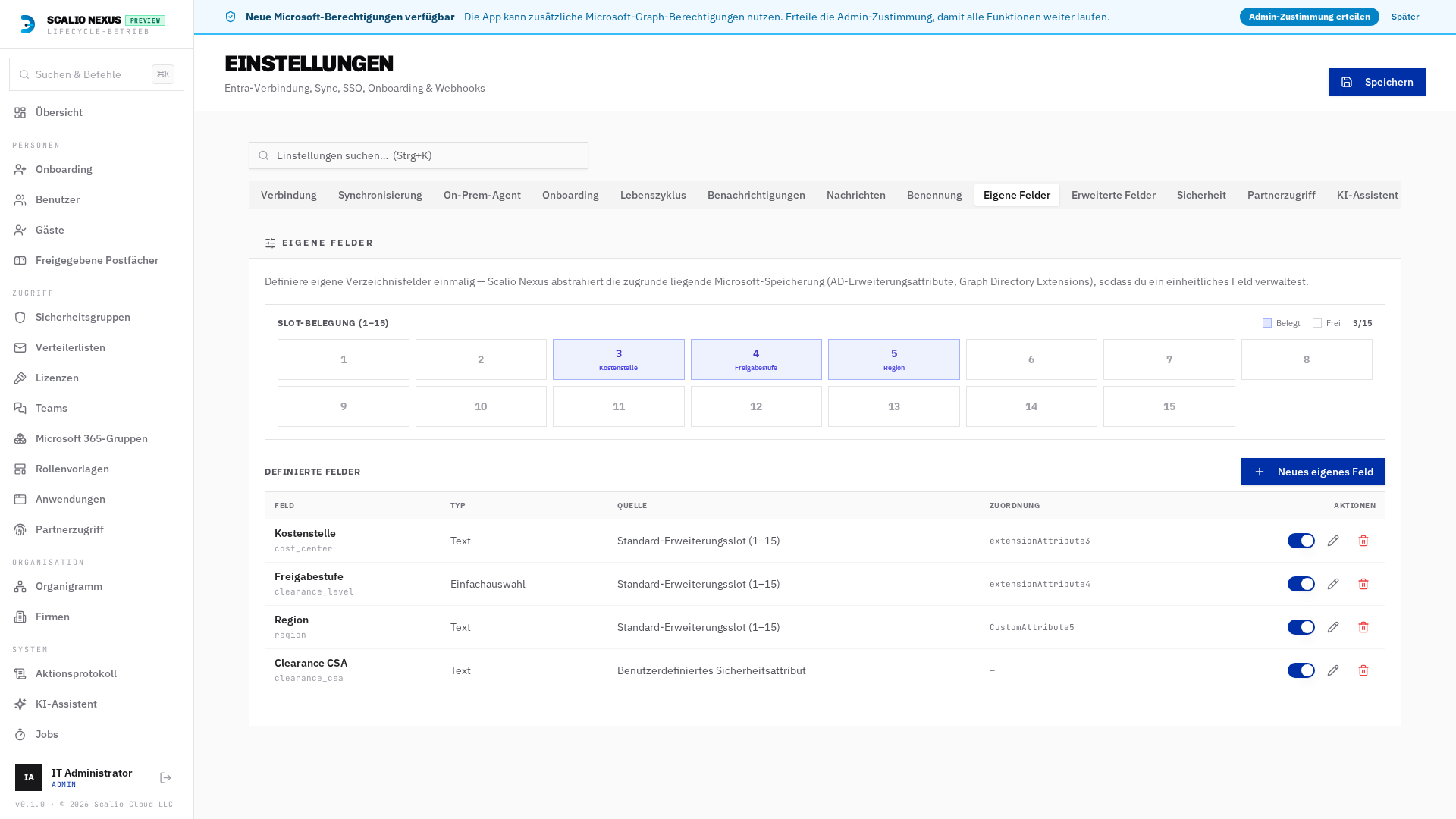
- Custom Fields (Eigene Felder) — fields you define. Scalio Nexus abstracts the underlying Microsoft storage (AD extension attributes, Graph directory extensions, custom security attributes) behind one field you name and configure.
- Extended Fields (Erweiterte Felder) — built‑in Microsoft directory properties (e.g. Employee type, Hire date, Cost center) that you simply switch on and configure. The data type is fixed by Microsoft; you only choose the label, validation and where the field appears.
Both surface on the employee detail view, in the onboarding wizard, and can be pushed back to the directory — hybrid users via the on‑prem agent, cloud‑only users via Graph / Exchange Online.
Custom Fields (Eigene Felder)
Storage providers
When you create a field you pick where it is stored. Scalio Nexus then handles all read/write routing for you.
| Provider | German label | Backing store | Notes |
|---|---|---|---|
| Standard Extension Slot (1–15) | Standard‑Erweiterungsslot (1–15) | extensionAttributeN / CustomAttributeN |
One shared pool of 15 slots. Written to on‑prem AD for hybrid users and to Exchange Online (Set‑Mailbox -CustomAttributeN) for cloud‑only users. |
| Modern Cloud Extension | Moderne Cloud‑Erweiterung | Graph directory extension | Cloud‑native, no slot limit. |
| Custom Security Attribute | Benutzerdefiniertes Sicherheitsattribut | Entra custom security attribute | Governance/attribute sets. |
Cloud‑only users need a mailbox for slot fields. A Standard Extension Slot on a cloud‑only identity is written with
Set‑Mailbox. If that identity has no mailbox, the write is rejected (no silent fallback) and the slot fields are hidden on that user's detail card with an explanatory note.
Slot occupancy map
The Slot‑Belegung (1–15) grid shows which of the 15 shared slots are in use (indigo, with the field name) and which are free — so you never double‑assign a slot. The counter reads used / 15.
Creating & editing a field
- Neues eigenes Feld opens a dialog: display name, key, data type, provider and (for slot fields) the slot number, plus validation (required, regex pattern, choices) and list‑column visibility.
- The pencil on any row edits only non‑breaking attributes (label, description, validation, read‑only, list column). Immutable properties (key, data type, provider, slot) are shown locked.
Extended Fields (Erweiterte Felder)
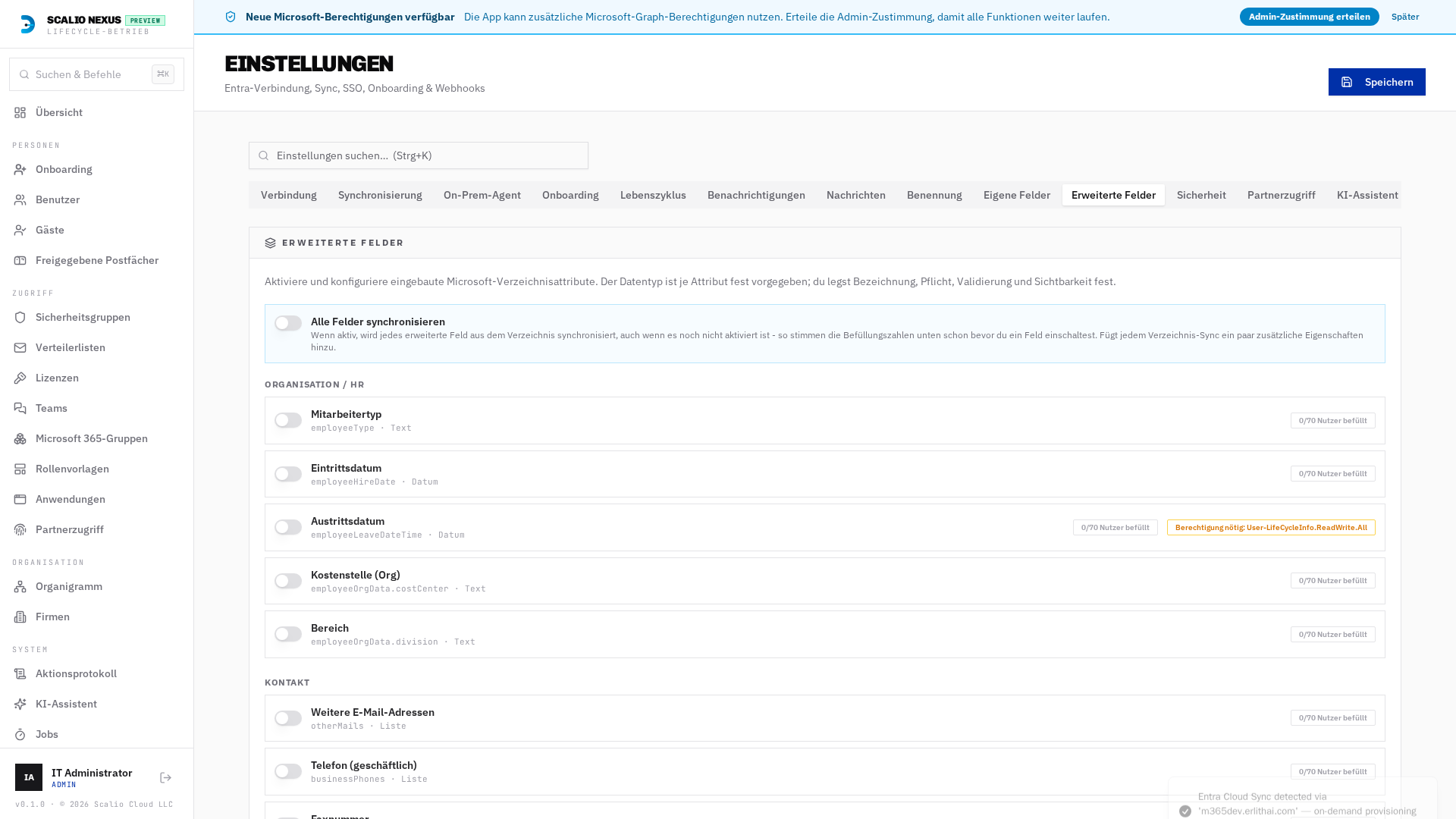
Each catalog entry is grouped by category — Organisation / HR, Kontakt, Compliance and Governance‑Signale (read‑only). Flip the switch to enable a field, then set its German/English label, whether it's required, an optional validation pattern, and per‑field visibility (onboarding form / employee detail).
- Read‑only governance signals (e.g. Erstellt am /
createdDateTime, Letzte Anmeldung) are display‑only and never written. - Permission hints. Some properties need an extra Graph scope (e.g. Letzte Anmeldung needs
AuditLog.Read.All+ Entra ID P1). A badge shows whether the scope is granted.
Field adoption count
Every field shows a n/total Nutzer befüllt badge — how many directory users already have a value.
This is computed from the synced user cache.
Sync all fields (Alle Felder synchronisieren)
By default only enabled Extended Fields are pulled during directory sync, so a disabled field always
reports 0 populated. Turn on Alle Felder synchronisieren to include every permission‑free catalog
property in the sync — the adoption counts are then accurate before you enable a field, helping you
decide which are worth turning on. It adds a few extra properties to each directory sync; permission‑gated
properties (e.g. sign‑in activity) are excluded so the core user read never breaks. Default off.
AD ↔ Entra sync‑drift detection
For hybrid users the reconciliation engine (see Cloud Sync and the Jobs → Runs history) compares the on‑prem AD value against the cloud copy and flags:
extAttrSyncMismatch— a Standard Extension Slot (extensionAttributeN) whose AD value hasn't synced to Entra.extFieldSyncMismatch— an enabled writable Extended Field (native property, e.g.employeeType) that differs between AD and Entra.
These checks only run when the on‑prem agent actually sends the relevant attributes. The console tells
the agent exactly which extra attributes to enumerate via its runtime config (inventoryAttributes) — the
list is derived automatically from your configured slots and enabled Extended Fields, so no manual agent
setup is needed beyond running a current agent build. See the Agent specification for the wire format.
HR module link
If the HR add‑on is licensed, an HR Employee field can be linked to a core Custom Field (Verknüpftes Verzeichnisfeld in HR → Settings → Mitarbeiterfelder). When HR data changes, the linked value is pushed to the linked directory user automatically, and onboarding seeds the field from HR.
Lifecycle rules can branch on fields
Both systems are exposed to the process/lifecycle designer so switch and condition nodes can branch on their values:
{{ user.custom_fields.<key> }}— e.g.user.custom_fields.clearance_level{{ user.extended_fields.<key> }}— e.g.user.extended_fields.employeeType,user.extended_fields.ageGroup
The picker in the process designer offers these paths alongside the standard employee context.